
For micro-exporters
Prepare the label, the invoice and the ETGB file in one place
Label your Etsy, eBay and Amazon orders with your own carrier account, and let the customs data travel electronically with the label.
Amazon: opening to new sellers soon · join the waitlist
 Start with Etsy · 14-day trial
Etsy's own approval screen opens, and we never ask for your password. Your account opens and your shop connects in the same step.
To sign in with Google, open this page in your browser. The app's menu is usually under ⋯ at the top right.
14 days free · No credit card · Cancel anytime
Founder price until 1 December: ₺3.999/month (then ₺4.999). No commitment.
By continuing you agree to the Terms of Use. We process your personal data as described in the Privacy Notice (KVKK).
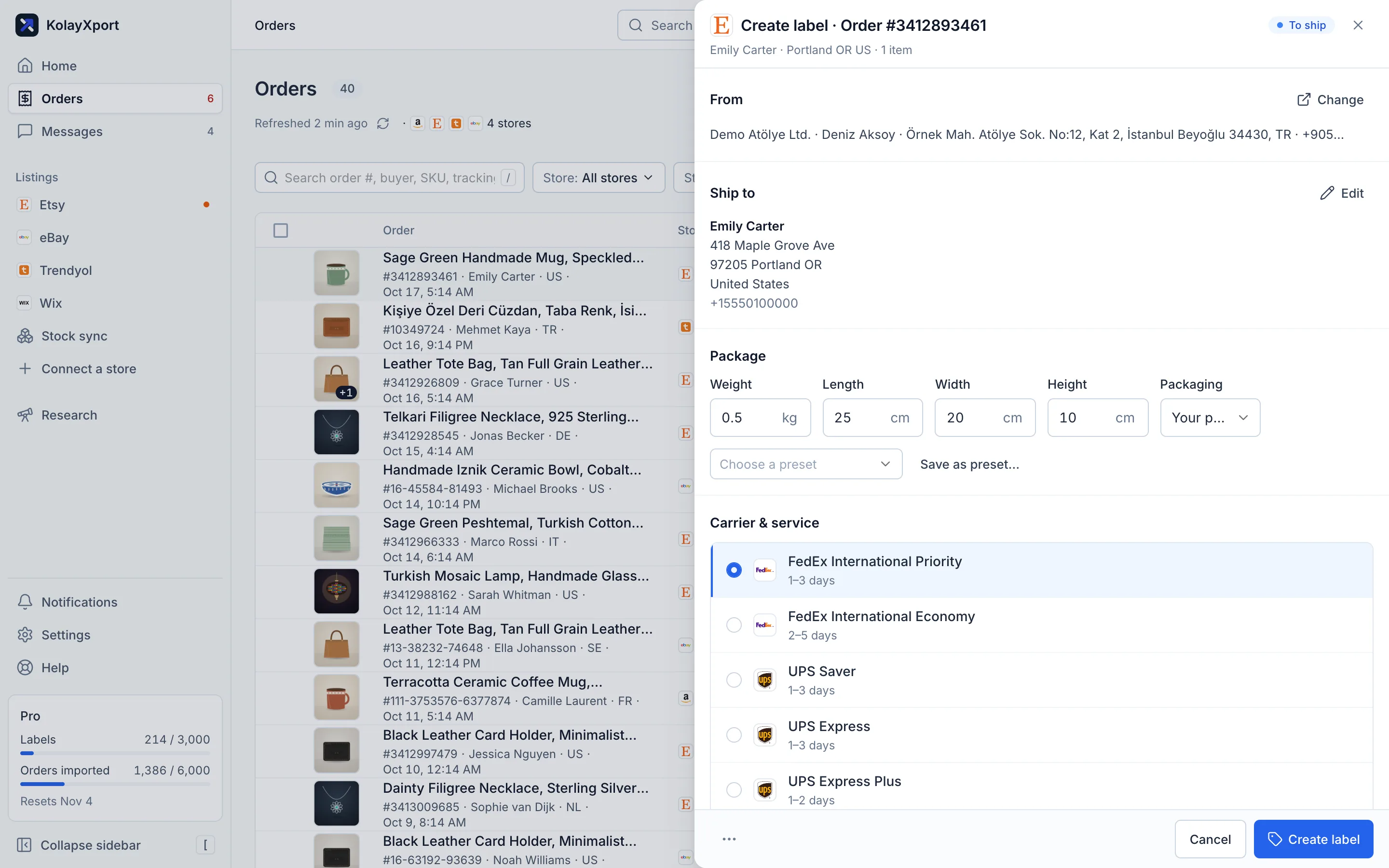
Screenshot from a demo account. Figures are illustrative.
Sound familiar?
“After every shipment I have to check the fees and the volumetric weight one by one, and I lose time on deductions I think are wrong.”
Source: Şikayetvar (translated from Turkish)
“They're all small home goods, 2–3 kg, about the size of a cushion. We need answers to a ton of questions about shipping, returns and so on.”
Source: Ekşi Sözlük (translated from Turkish)
What KolayXport does
Labels with your own FedEx account
Print International Priority and Economy labels from the app. The price is your own agreement with FedEx.
Labels with your own UPS account
Print labels with UPS international services; IOSS and VAT details are checked before the shipment is created.
Electronic commercial invoice
The commercial invoice travels electronically with the label: ETD for FedEx, EDI for UPS. You enter an HS code and a description per item.
Bulk labels
Select your orders; domestic ones go to DHL eCommerce, international ones to FedEx or UPS, and labels are printed one after another.
ETGB spreadsheet
An Excel file for ETGB is built from the international orders you select and emailed to the customs broker set in Settings.

How it works
Fill in your sender profile and enter your own FedEx or UPS API details under Settings › Connections.
Check each item's HS code and description on the order, then print labels one by one or in bulk.
Print the pick list and packing slips, and send the ETGB file for the selected orders to your broker.
International shipping isn't just about price, it's about paperwork
Volumetric weight surprises, unexpected deductions and checking the charge after every shipment are everyday problems for a lot of sellers. For a seller with their own FedEx or UPS account, the real workload is paper: the label, the commercial invoice, HS codes, and the list that goes to the broker for ETGB.
How an international shipment is prepared in KolayXport
Your Etsy, eBay and Amazon orders come into the same list. Once you've entered your own FedEx or UPS API details, you print the label from the order. The commercial invoice is sent electronically with the label: ETD for FedEx, EDI for UPS. All you provide is an HS code and an English description per item. For UPS, IOSS and VAT numbers are checked before the shipment is created.
With many orders, select them all on the bulk label screen. Domestic orders go to DHL eCommerce and international ones to FedEx or UPS; labels print one after another, and if something fails you can stop and retry. Then print the pick list and packing slips.
For ETGB, an Excel file is built from the international orders you select and emailed to the customs broker you've set in Settings. You can send up to 100 orders at a time.
Getting set up
Fill in your sender profile completely before printing labels; the company name, address and phone number on the label come from there. Entering your products' HS codes and English descriptions correctly once saves time on every later shipment. The exporter name, tax number, default HS code and origin in the ETGB file also come from your sender profile; if they're missing, the file isn't built. Don't forget to set the broker's email address for ETGB in Settings.
What we don't do
- We don't file the ETGB; we prepare the file and send it to your broker.
- We don't sell shipping or promise discounted rates. FedEx and UPS need your own account.
- We don't track FedEx and UPS shipment status in the app, and labels are voided on the carrier's portal.
- We don't calculate duties, DDP or IOSS.
- No Yurtiçi, Aras, Sürat or PTT labels; domestically there's only DHL eCommerce (MNG Kargo).
- Etsy's own shipping labels (Etsy Postage) aren't supported.
Frequently asked questions
Does KolayXport file the ETGB declaration?
No. KolayXport puts the order data needed for ETGB into an Excel file and emails it to your customs broker. Your broker files the declaration.
Are the shipping rates cheaper than ShipEntegra?
We can't say, because KolayXport doesn't sell shipping. You print labels with your own FedEx or UPS account, so the price depends on your agreement with the carrier.
Can I ship domestically with FedEx or UPS?
No. FedEx and UPS are for international shipments only. Domestically you can print DHL eCommerce (MNG Kargo) labels; there are no Yurtiçi, Aras or Sürat labels.
Can I track or void FedEx/UPS shipments in the app?
The tracking number is stored and sent to marketplaces that support it, but we don't show shipment status. To void a label, we send you to the FedEx or UPS portal.
Is my e-Arşiv invoice issued automatically?
If you've connected Paraşüt, an invoice is attempted in Paraşüt while the ETGB file is sent. There's no separate 'issue invoice' button, and if Paraşüt returns an error the ETGB email still goes out, so check your invoices in Paraşüt.
Do you calculate duties or DDP?
No. For duties, DDP and IOSS registration, work with your carrier and broker. The UPS label checks IOSS/VAT details but doesn't calculate any tax.
Related pages
- Ask ChatGPT and Claude about your shopConnect your KolayXport account once, then ask about your orders, sales and listings in everyday language. Listing suggestions are saved as drafts, and you send them to the marketplace.Read more
- Bulk edit your eBay listings, and see every change before you send itItem specifics, category, business policies, photos, price, stock and variations, across many listings at once. Changes are staged first, so nothing changes on eBay until you send it.Read more
- Find what to sell on eBay and list it in minutesRun your eBay business from product research to listing, and from order to tracking number, in one bilingual workspace.Read more
Strengthen your first listing today
Connect your shop, have one listing's English copy rewritten and see the difference yourself.
14 days free · No credit card · Cancel anytime